
reservation Booking engine

You configure every booking step. You keep every guest

You set booking steps, add-ons, and payment methods. Guests book on your own domain, and every booking becomes a reservation in your platform, with the guest record attached.

PCI DSS certified payments Live availability from the platform No commission on direct bookings
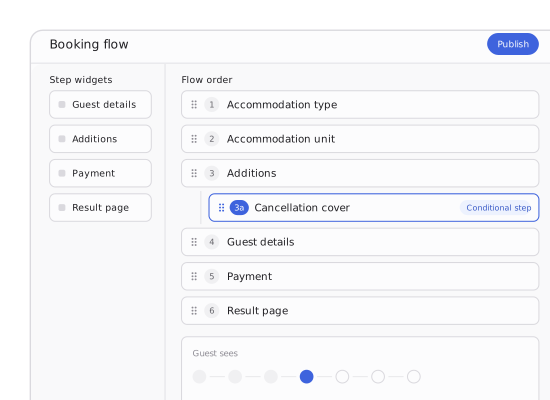
Booking engine flow configuration with the guest-facing booking steps

Taking direct bookings on the Maxxton booking engine

De Krim Texel
Sandaya
Lifestyle Holidays
EuroResorts
Configured

The steps are yours, not ours

Booking steps are pages you choose and order yourself. Operators on Maxxton run flows from three to seven steps, on the same product.

Connected

One source for availability and price

Every screen reads live from the reservation platform, so what a guest sees is what they can book, at the price you set.

Converted

Fewer reasons to leave halfway

The booking flow adapts to phones, tablets and desktops, with mobile-friendly images, fast loading and checkout without zooming. Conditional steps appear only for the guests they apply to, and unfinished bookings survive a device change.

Every guest who reaches your booking flow and does not finish it goes on to book somewhere that charges you commission.

The flow asks for every traveller’s age before the guest has even decided they want the accommodation.

There’s a step you would remove tomorrow, except the flow belongs to the vendor, not to you.

A guest gets to step four on their phone, opens a laptop, and starts again from an empty date field.

None of that is a checkout problem. It is that the flow was designed once, by someone else, for a guest who books a holiday the way they buy a pair of shoes. Booking a week away takes longer, and it should. What matters is that every step earns its place, and the ones that do not apply never appear.

routeBook

Configure every step of the booking

Each booking step is a page, and the flow is the order you put them in. Add one, drop one, rename or translate it without a release. Conditional steps go further: an insurance or cancellation cover step appears only for guests who have not already added it. Every step carries its own web address, so a half-finished booking survives a device change.

Carry your colours, logo, fonts and imagery into checkout so the booking flow keeps your visual identity, not just your domain.
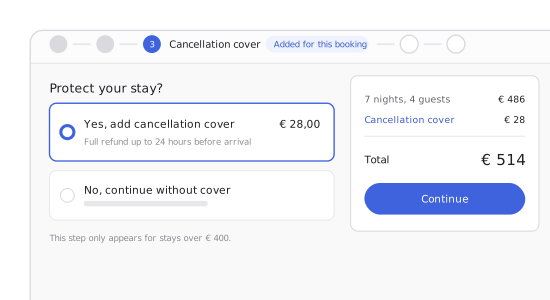
Cancellation cover step inserted into the guest booking flow

sellUpsell

Relevant add-ons, not a catalogue

Products, extras and packages are grouped the way you sell them, and you choose which ones lead. Underneath, a machine learning model trained on past bookings, travel party, dates and length of stay decides what else is worth showing this guest. No high chair for a party with no children. No electricity hook-up on a lodge.
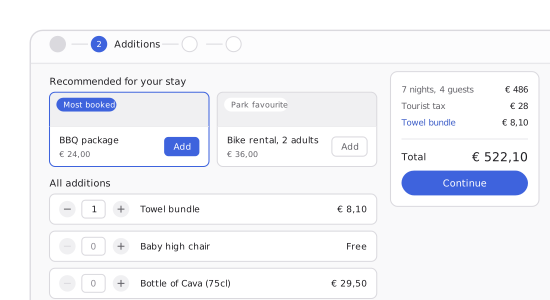
Additions step with recommended add-ons and the booking total

paymentsPay

Payment that fits the market, not just the checkout

Set payment methods per site and per market, so a Dutch guest sees iDEAL | Wero and a German guest sees what they expect. Take the full amount, a deposit, a deposit with the balance before arrival, or partial payments across the stay. Payment need not happen in the flow at all: a secure page on your own domain lets a guest settle from an email without logging in, and stops showing options once a reservation is cancelled.

Card payments support 3D Secure authentication.
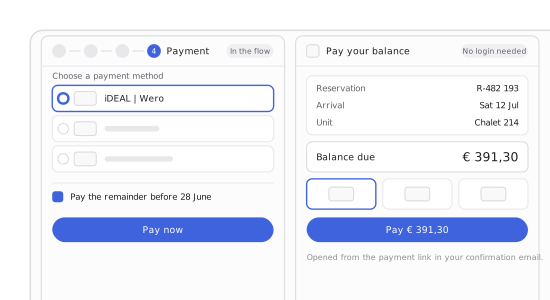
Payment step in the booking flow and the login-free balance payment page

event_repeatReturn

The guest portal is where the next booking starts

The weeks between booking and arrival are the only time a guest is committed and still curious. Most systems use them to send one confirmation. In the portal, the guest completes their own travel party, settles what is outstanding, and books the add-ons and activities they would otherwise decide at the barrier, or not at all. Your guest help desk stops fielding the calls that never needed a person. Returning guests can hold the same accommodation before next season's rates are published.
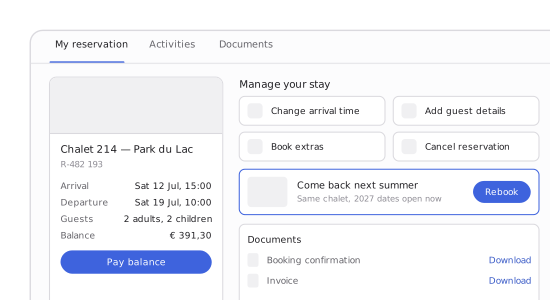
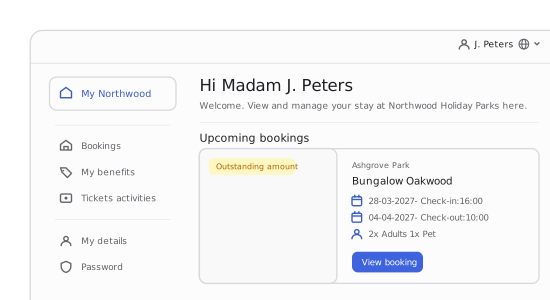
Guest portal reservation page with manage-your-stay actions and a rebook option

Guest portal

Built for everything after “Book now”

Guest portal with the upcoming booking and outstanding amount

Fewer questions. More value from every stay

  • An immediate, clear record of what was booked
  • Fewer pre-arrival calls and emails
  • Guests can change their reservation themselves
  • More opportunities for add-ons and activities
  • Payment terms and outstanding balances always up to date

Everything the flow runs on, in one place

Configured once, in the platform, without a developer for each change.

01

Booking steps

Add, remove, reorder or rename a step without a release. Each one is a page you control.

02

Conditional steps

Insurance, cancellation cover or an upsell step that appears only for the guests it applies to.

03

Shareable step URLs

Each step has its own address, so a booking can move between devices or people.

04

Add-on groups

Group products, extras, and compositions the way you sell them, with your own favourites first.

05

Recommendations

A machine learning model weighs travel party, dates, length of stay and accommodation.

06

Payment methods

Set per site and per market, with deposits, instalments and partial payments across the stay.

07

Login-free payment

A tokenised page on your own domain, sent by email, that closes when the reservation does.

08

Guest self-service

Travel party, arrival time, documents, outstanding balance and rebooking, without a call.

Questions operators ask before they change the flow

Is the booking engine a separate product, or part of the Maxxton platform?

The Maxxton Booking Engine is part of the Maxxton platform, not a separate product. It reads availability, prices, and accommodation content live from your reservation platform rather than syncing to a copy, so what guests see is always bookable.

Can we keep our own website and use only the booking engine?

Yes. Sandaya and Corporate Housing Factory run the Maxxton booking engine without a Maxxton website. You can embed the flow on your own domain or access it through the API.

Where do search and the results page sit?

On the website side. Search, filters and how results are presented belong to the pages a guest browses before they commit, so they sit in the website & CMS. The booking engine starts once a guest has chosen.

How many steps should our booking flow have?

There is no right number, only wrong ones. Operators on Maxxton run three or seven steps, and both convert. Extra steps are fine as long as each one guides the guest rather than delaying them.

Does it handle pitches and rental units differently?

Yes. Pitches usually allow arrivals on any day while rental units run fixed changeover days, so the flow can ask which the guest wants up front and apply the right arrival rules.

How do add-on recommendations decide what to show?

A machine learning model trained on previous bookings weighs the travel party, the dates, the length of stay and the accommodation. You still set which add-ons lead, so recommendations extend your selection rather than replace it.

We list on Booking.com too. Does a booking engine fight that?

No. OTAs help guests discover and compare, while your booking engine gives them a better way to book with you. Show what OTAs cannot: your own add-ons, offers and booking experience, at a price you set. Both channels draw from the same inventory, so availability stays in sync.

A guest arrives from an AI assistant or comparison site. What do we actually keep?

The booking, the guest record and the context around it: where they came from, what they searched for and what they nearly booked. That information stays in your platform, regardless of the channel that brought them there. Channels change. What you know about your guests stays with you.

Can guests book several pitches or accommodations in one booking?

Yes. Guests can select several pitches or accommodations in one online booking, for example at camping and outdoor hospitality properties. Families and groups do not need separate bookings or a telephone enquiry.

Can guests choose their exact pitch or accommodation on a map?

Yes. An interactive property map lets guests choose the exact position of their pitch or accommodation relative to views, amenities or other units.

Bring us the step you would remove

Show us your current booking flow, and we will rebuild it in configuration while you watch.